Mas

Home | Games | Mas | Mas WarThunder

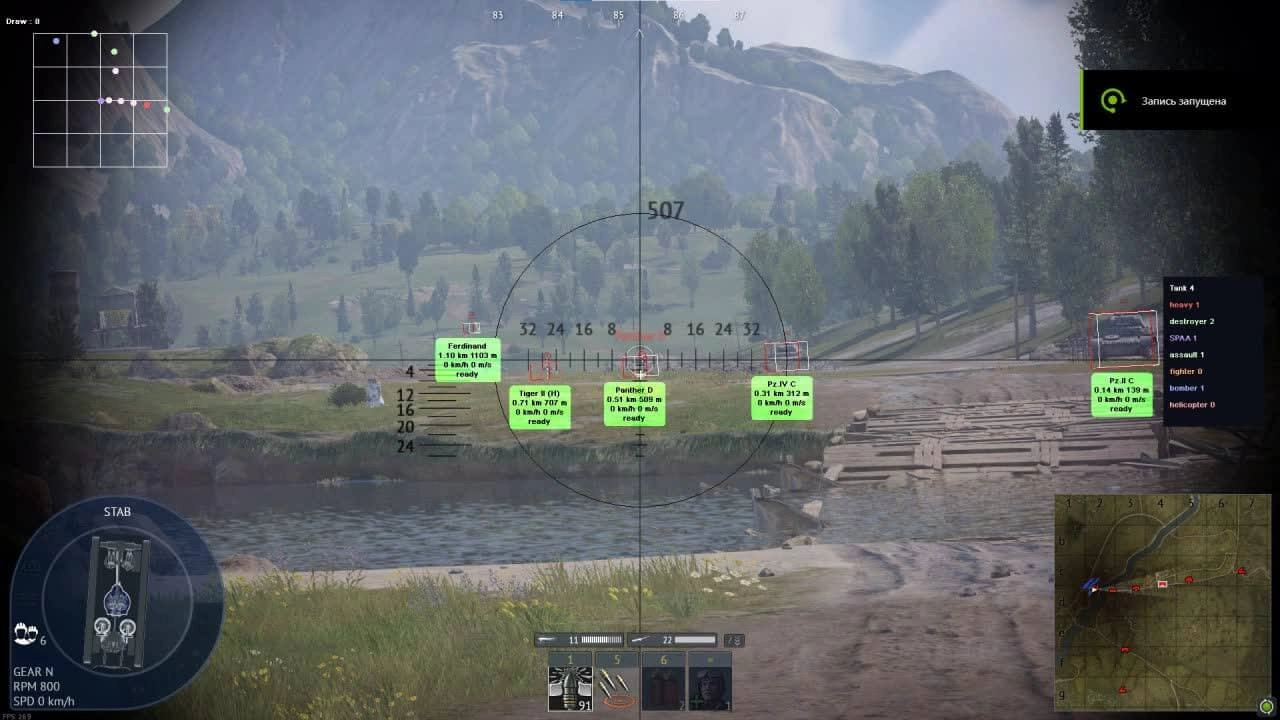
MASON's private software for War Thunder is your loyal ally on the battlefield, offering a powerful Aimbot for aiming and tracking enemies in the air and on the ground. With the function of visualizing 3D boxes around enemies, information about reloading and distance, as well as the ability to predict the position of equipment, players gain absolute control over the situation. The included radar allows you to track planes, tanks and other objects with full color and display settings. Additional features such as an arcade scope and customization for bombs and missiles make MASON an indispensable tool for achieving tactical advantage and dominance in the battles of War Thunder.
  • AIMBOT
  • Enable / Enable the aimbot, it operates in two modes: ground equipment and aerial, working in the air may differ from working on ground equipment
  • Bind / Set the aimbot activation key, the selected key must be clamped and held
  • Draw fov / Display the range of the aimbot, circle FOV
  • Fov / Set the range of the aimbot, circle FOV
  • VISUALS
  • Enable 3D box / Display 3D boxing around opponents
  • Last info / Display information about a tank that has no information about it
  • Last info time / Set the time for how long it will be displayed, from 1 to 10 seconds, additionally the display color is set
  • Info / Information
  • Name / Display names
  • Reload / Display recharge information
  • Distance - M / Display the distance in meters
  • Distance - KM / Display the distance in kilometers
  • Speed - M / Display speed in meters
  • Speed - KM / Display the speed in kilometers
  • Nickname / Display nicknames
  • Velocity / Enable speed points, displays the location of the equipment with dots on the screen, after a certain time that you set in the settings menu
  • Dot / Set the number of displayed dots on the screen
  • Time / Set the time when the dots are displayed on the screen
  • * There are 25 points in total, point 1 indicates position 0, point 2 indicates the position where the technique will be in 2 seconds, etc.
  • Prediction pos / Enable the predictor of the technique's position
  • WORID
  • Enable bomb / Enable the display of bombs, additionally the color of the bomb circle is set
  • Bomb velocity / Enable speed points, displays the location of bombs with dots on the screen, after a certain time that you set in the settings menu
  • Dot / Set the number of displayed dots on the screen
  • Time / Set the time when the dots are displayed on the screen
  • Enable Rocket / Display the launched missiles on the screen and radar, additionally the color of the missile display is set
  • Bomb velocity / Turn on speed points, displays the location of missiles with dots on the screen, after a certain time that you set in the settings menu
  • Dot / Set the number of displayed dots on the screen
  • Time / Set the time when the dots are displayed on the screen
  • * There are 25 points in total, point 1 indicates position 0, point 2 indicates the position where the bomb/missile will be in 2 seconds, etc.
  • MISC
  • Arcade crosshair / Turn on the arcade scope
  • Arcade Esp (Enable only RF) / Enable arcade Esp, additionally the predicate position of the game will be displayed
  • Bomb crosshair / Turn on the arcade bomb scope
  • Radar / Radar
  • * Additionally, there is a color setting, when you select a specific color, it will be changed everywhere: radar, unit info, box color
  • Units info / Display information about units
  • Tank / Tank, light, medium
  • Heavy / Heavy Tank
  • Destroyer / self-propelled guns
  • SPAA / Anti-aircraft gun
  • Assault / Fighter
  • Fighter / The assault
  • Helicopter / Helicopter
  • Bomber / Bomber
  • Text bg color / Set the background color of the text
  • OTHER
  • Load config / Load settings from Clipboard
  • Save config / Save settings to clipboard

  • Status

    We recommend

    Prices start from

    3.5 $

    System requirements:

    Supported game client Steam, Game Launcher

    Anticheat: EAC

    Walking on the record in OBS: No

    Supported game modes: The window, frameless, full -screen

    Supported processors: Intel and AMD

    Supported systems: Windows 10 , Windows 11